¶ Overview
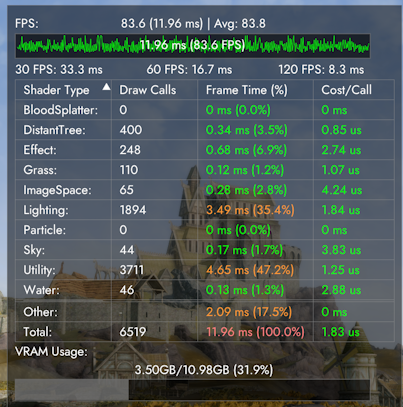
The performance overlay displays performance metrics collected by CS such average frame rate, draw calls, VRAM usage and more.
¶ Key Features
- Real-time FPS and frame time tracking with configurable update intervals
- Interactive draw call analysis with per-shader type performance breakdown
- VRAM usage monitoring with visual progress bars
- Frame time graphs for pre and post-frame generation analysis
- A/B testing support for performance comparison between configurations
- Color-coded performance metrics with customizable thresholds
- Movable overlay window with persistent positioning
¶ Settings
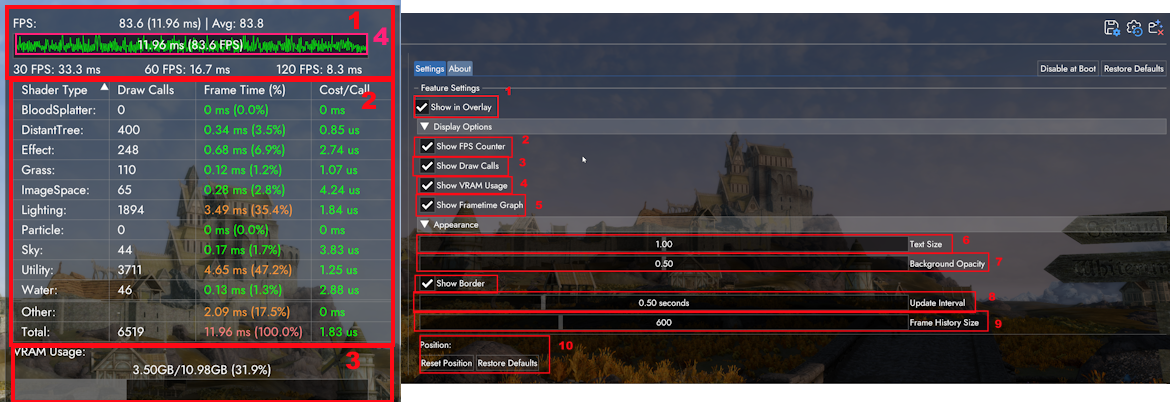
The settings for the Performance Overlay mostly toggles the visibility of its components. The below screenshot labels the components (on the left side) and the settings (on the right-side).
¶ Settings Overview
- Toggles the overlay display (that is, the whole component).
- Toggles the FPS counter (The component labelled 1).
- Toggles the Draw Calls & Shader Performance display (The component labelled 2).
- Toggles the VRAM Usage display (The component labelled 3).
- Toggles the Frame Time Graph (The component labelled 4).
- Changes the text size by a percentage. Default text size is inherited from the Community Shader's base theme, which sets the text size based on your monitor's resolution size.
- Changes how opaque the overlay is.
- Changes the how often the Frame Time graph is updated.
- Changes the size of the Frame Time graph.
- Resets the position and/or the settings of the overlay.
¶ FAQ
¶ Does the performance overlay show the real FPS or is Frame Gen considered?
The overlay only shows the native FPS, and does not count generated frames.
¶ What shaders does the "other"/"utility" category comprise of? And why do they use up so much frame time?
Others is a mix of shaders that don't fit into any other pre-defined categories, while utilities are a set of shaders mostly concerned with shadows. It's normal for them to have high frame time because they are rendering everything not included in the other categories.
¶ Does the Performance Overlay affect performance? Can it be disabled?
The performance overlay does affect performance, but can be disabled at boot to remove the performance impact.
¶ How can I display the Performance Overlay without using the Community Shaders Overlay?
Press F10 to toggle the overlay in-game.