¶ CHANGING USER SETTINGS
You can modify the default settings for most of my mods by modifying your local Engine.ini file.
For Example, with the Dodge mod you can change the stamina cost of dodging to 0 by adding the following two lines at the bottom of your Engine.ini file:
[/Dodge/Mods/Dodge/ModActor.ModActor_C]
DodgeCost = 0.0
¶ Finding and Modifying Engine.ini
Follow the steps outlined below to find your Engine.ini and apply custom parameter values:
- Navigate to your
Stalker2\Saved\Configfolder.
This can be found by using one of the following methods:- Use Windows File Explorer to navigate to the following directory, where
UserNameis your actual Windows Username:
C:/ └── users/ └── UserName/ └── AppData/ └── Local/ └── Stalker2/ └── Saved/ └── Config - Use Windows File Explorer to navigate to the following directory, where
- Copy and Paste the following into the windows command prompt and then press ENTER
explorer %localappdata%\Stalker2\Saved\ConfigYou can open the windows terminal by typing
cmdinto the taskbar search followed by pressing the ENTER key
- In the
Configfolder you will see either a folder called:
Windows- if you have the Steam version of the gameWinGDK- if you have the GamePass or XBOX Store version of the game
Open the one that you have for your version of the game and look for a file calledEngine.ini
- Open the
Engine.inifile in notepad (or create one if none exists)
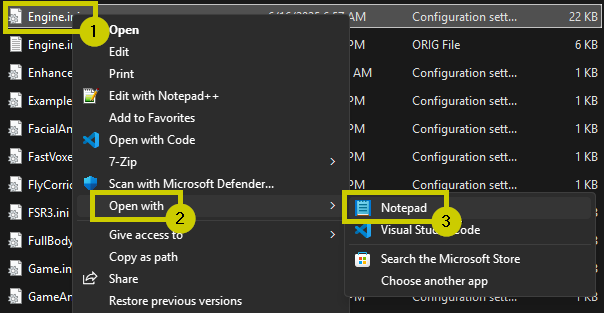
Do not use Microsoft Word or WordPad, these programs can add unwanted characters into the file when you save your changes.
- Scroll to the bottom of the now opened
Engine.inifile
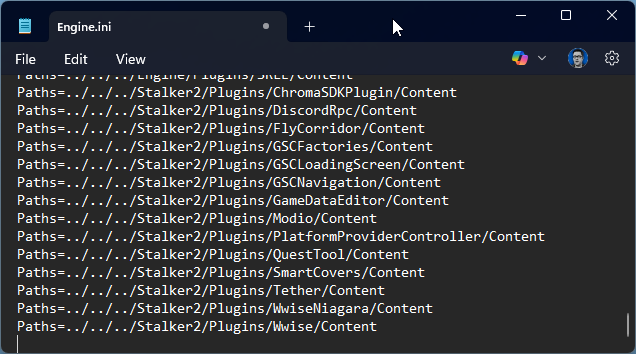
- Press the ENTER key a few times to make sure there is at lease one blank line before your cursor.
- Type in the path to the mod file which contains the configuration variables you want to edit.
This path can be found in the individual mod configuration pages on the panel to the left of this page.
For this example we will use the Dodge mod.
Its configuration description page can be found here: dodge
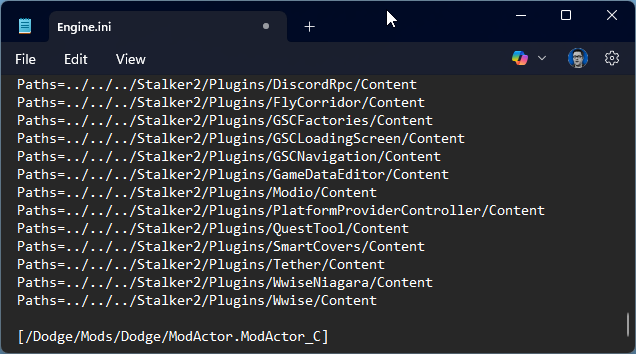
7. Add in any config parameters that you want to assign different values to (you only need to provide the ones you want to change)
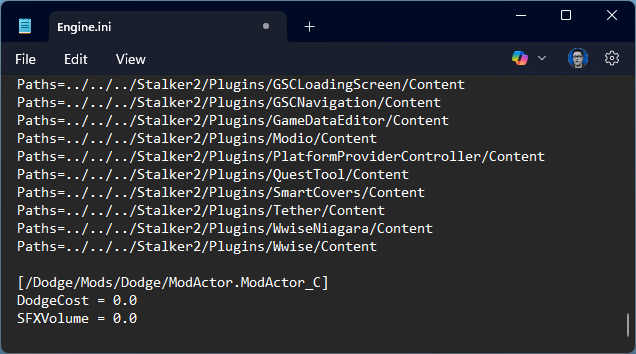
8. Save and close the Engine.ini file.
9. Open the game and ensure your setting changes work.