¶ Sorry you're having trouble
Something breaking in Vortex is frustrating, and most of it is fixable once we can see what happened on your machine. This page covers what to send so someone can act on it.
Not sure it's a bug? If a mod won't install, a game won't launch, or something just looks wrong, ask on the Nexus Mods Discord first. The community usually answers faster than a bug report can be triaged.
¶ What to include
- Your Nexus Mods username.
- A support bundle from Vortex.
- A detailed description of the problem.
- Steps that reproduce the problem, when possible.
¶ Create a support bundle
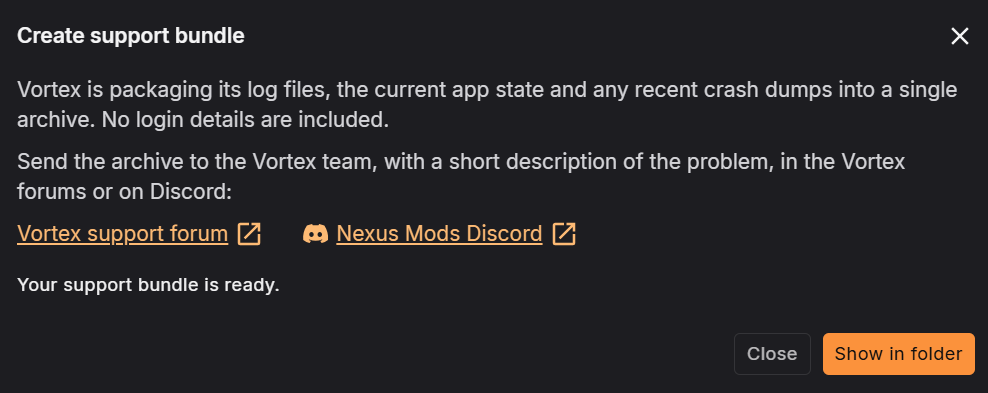
Vortex packages its log files, the current app state, and any recent crash dumps into a single archive. No login details are included.
Report bugs only for the latest version of Vortex, whether you use the stable or beta release.
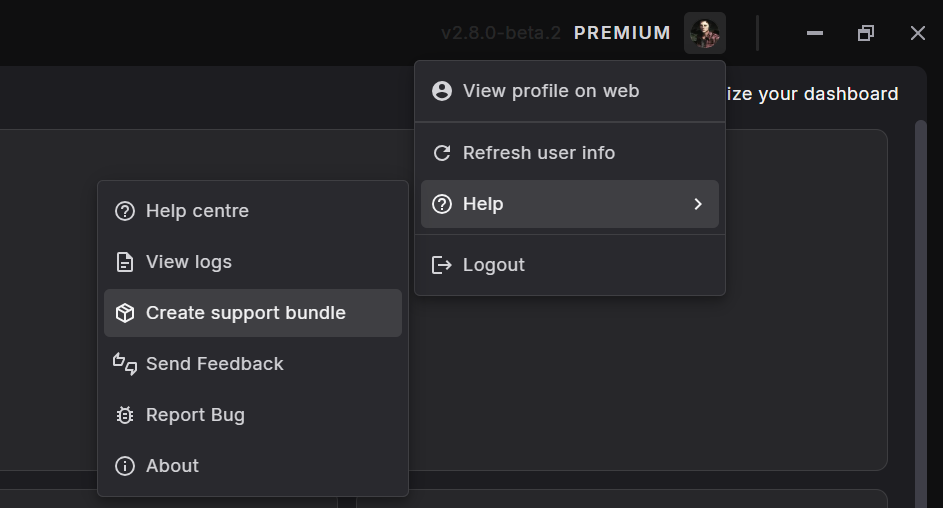
In Vortex, click your profile picture in the top right, then go to Help and select Create support bundle.
Wait for Vortex to finish building the bundle.
Click Show in folder once the bundle is ready.
Upload the support bundle archive with your report.