¶ Vanilla Setup Guide
Welcome to the official Community Shaders User Wiki.
This page outlines the vanilla setup.
This wiki is powered by the Nexus Mods documentation system and maintained by the community.
For more advanced information, see the GitHub Developer Wiki.
Need help or want to chat with the community? Join us on Discord:

¶ Overview
This page is for people who already have a stable modded setup with the full Community Shader suite properly installed. For those that haven't, please first follow guides such as A Dragonborn's Fate or the Step Modifications Guide for Skyrim, as well as our Installation Guide for Community Shaders. For those migrating from ENB check out our ENB Migration Guide.
The provided FOMOD options are recommended settings only.
Please make sure to read the descriptions of the mods you download, it saves mod authors and support a lot of time and effort. ❤️
Community Shaders does not make any significant artistic changes to your game. That means your game will look artistically vanilla even with CS installed. As a result, if you're looking for something different from the vanilla Skyrim look, you should look into post processing, installing a lighting mod, and a weather mod.
¶ Fixes
¶ Particle Patch
Particle Patch fixes various meshes which may appear too bright or dark.
Download Particle Patch from Nexus Mods.
¶ Assorted Mesh Fixes
Fixes various issues with vanilla Skyrim meshes that causes them to render incorrectly.
Download Assorted Mesh Fixes from Nexus Mods.
¶ Improved Eye
Fixes various eye mesh bugs, such as eyes appearing too bright.
Download Improved Eye from Nexus Mods.
¶ Post Processing
Post processing is a technique used in all sorts of media, ranging from photography, films, and even video games. You may be familiar with the ENBSeries mod, which is one of the pioneer Skyrim post processing mods. ENB and its presets have gained popularity for how much they can transform the look and feel of Skyrim, and how varied the presets can be, ranging from highly saturated fantasy worlds to bleak tundras.
Community Shaders currently supports post processing with the Effects 11 feature. This feature allows you to use the huge catalog of ENB presets to tailor your game visuals. Please review the FAQ in case your desired ENB preset is not compatible with CS. Review the ENB Migration Guide if you want to know how to install Effects 11 with a preset and/or need recommendations.
The Community Shaders team is working hard on a new CS native post processing feature that can better take advantage of CS features, such as HDR Display. It will also include features that are not supported with Effects 11, such as depth of field. These features are being tested on the Discord Server. CS post processing is an alternative to Effects 11 and is not directly compatible as a result.
If you choose to use Effects 11 with an ENB preset, you should respect the ENB preset's weather and lighting mod requirements if you want the intended look for the preset. Installing an alternative weather or lighting mod won't break your game, but it may result in visual issues. In this case, we recommend that you skip the Lighting and Weather sections below and instead jump to the Other Visuals section.

From the NAT Effect 11 mod page
¶ Lighting
Lighting mods are responsible for modifying the artistic placement, intensity, and appearance of lights in interiors. Lights play a huge role in crafting the look and feel of your interiors, so a lighting mod is recommended alongside Community Shaders.
Before installing anything, please install Light Placer. This is a framework to enable several of the recommended lighting mods below.
Lighting mods manually place lights in either interiors or exteriors. Because of this, authors often separate the edits into two seperate plugins, one for exteriors, one for interiors. This allows users to mix and match interior and exterior edits from different mods. Please note that your exterior lighting is also affected by your weather mod.
PLEASE READ COMPATIBILITY NOTES ON THE NEXUS MODS PAGES. Lighting mods are often incompatible with each other. There are few exceptions, such as with CS Light, ATLM, and Helios.
¶ CS Light
If you are coming from ENB, you are probably familiar with ENB/particle lights. These mods attach light bulbs to meshes that otherwise would not emit light. This ranges from potions, ingredients, armors, alchemy tables, etc.
For those who already have ENB lights installed, you can continue using them if they are not causing issues. CS supports ENB particle lights. However, ENB lights do not support detection level and are generally not treated as "real" lights by the Skyrim engine.
CS Light is a mod that utilizes Light Placer to attach light bulbs to meshes that normally do not emit light in Skyrim, but unlike particle lights, they are recognized by the engine and contribute to mechanics such as detection level. CS Light also does not touch your meshes directly, making it much more compatible than particle lights.
CS Light, unlike other lighting mods, is highly compatible with other lighting mods. The only exception are mods that do the same thing, such as ENB lights.
Download CS Light from Nexus Mods.

¶ True Light & Window Shadows Ultimate
¶ True Light
True Light is a modern lighting overhaul that takes advantage of Community Shaders' Light Limit Fix and Inverse Square Lighting features. It is utilizes Light Placer to place its lights, which significantly reduces the number of patches required compared to other lighting mods.
True Light takes advantage of inverse square lighting, which enables a much more natural light fall off. Read more about Inverse Square Lighting. True Light also has an optional exterior lighting addon. Please review the compatibility notes for True Light before enabling the interior and/or exterior options.
It is recommended to pair True Light with Window Shadows Ultimate. Be sure to select the correct patch options in the FOMOD.
Download True Light from Nexus Mods.
Please review the requirements for True Light and the requirements for the requirements.
¶ Window Shadows Ultimate
Window Shadows Ultimate casts shadows from windows in interiors. You may be familiar with a similiar feature from Lux or ELFX Shadows. Download Window Shadows Ultimate and its patch hub from Nexus Mods.


Pictures from the True Light mod page, but also feature WSU
¶ Lux CS
Lux CS is a patch for Lux that takes advantage of filmic tonemapping, inverse square lighting, and other minor adjustments to work better with CS. Do NOT uninstall Lux, Lux CS is a patch which requires Lux installed.
Download Lux CS from Nexus Mods.
If you are using an ENB preset with Effects 11, you may want to skip Lux CS as some of the adjustments are already handled by your ENB preset. You can look into ISL Helper instead if you are interested in Inverse Square Lighting.
Lux CS is incompatible with Ambient Templates for Lighting Mods, Windows Shadows Ultimate, True Light and many other lighting mods. READ THE NEXUS PAGE.

 Pictures from the mod page
¶ Other popular lighting mods
Generic lighting that mods work with CS but do not use the CS tonemapper or Light Placer.
Do not use EVLaS, Sky Sync fully replaces it. Do not mix lighting mods.
- Lux Via and Lux Orbis (exteriors only)
- ELFX (contains seperate plugins for interiors and exteriors)
- Luminosity Lighting Overhaul (interiors only)
- Relighting Skyrim (contains seperate plugins for interiors and exteriors)
- Skyrim is Luminous (light source edits, check for compatability in description)
- Lightened Skyrim (contains seperate plugins for interiors and exteriors)
¶ Weathers
Weather mods change exterior lighting and edit the vanilla Skyrim weathers to be more realistic and take full advantage of the Community Shaders suite. Be sure to read the descriptions on these mod pages as they often contain links to other visual mods. Check if your favorite weather mod has been ported to CS.
Never mix and match weather mods. However certain CS weather patches will require the original mod and its requirements installed as well.
If you are using an ENB preset with Effects 11, you may want to skip the CS weather patch as some of the adjustments are already handled by your ENB preset. In this case, you should respect the weather requirements of your ENB preset.
Here is a non-exhaustive list of popular CS weather mods:
- NAT.CS III by dBottle
- Obsidian CS by dBottle
- Astralite Weathers by Laminin
- Azurite III CS by Dlizzio
- Vanilla CS by dBottle
- Real Weathers Remastered by PixelsSquared
- Nirn Whispers by CarbonDice
- etc.
¶ Other Visuals
¶ Windows Emittance Consistency
Window Emittance Consistency fixes inconsistencies in window brightness in worldspaces so you don't get overly bright or overly dark windows at night. See the images on the mod page for a before and after comparison.
¶ Helios
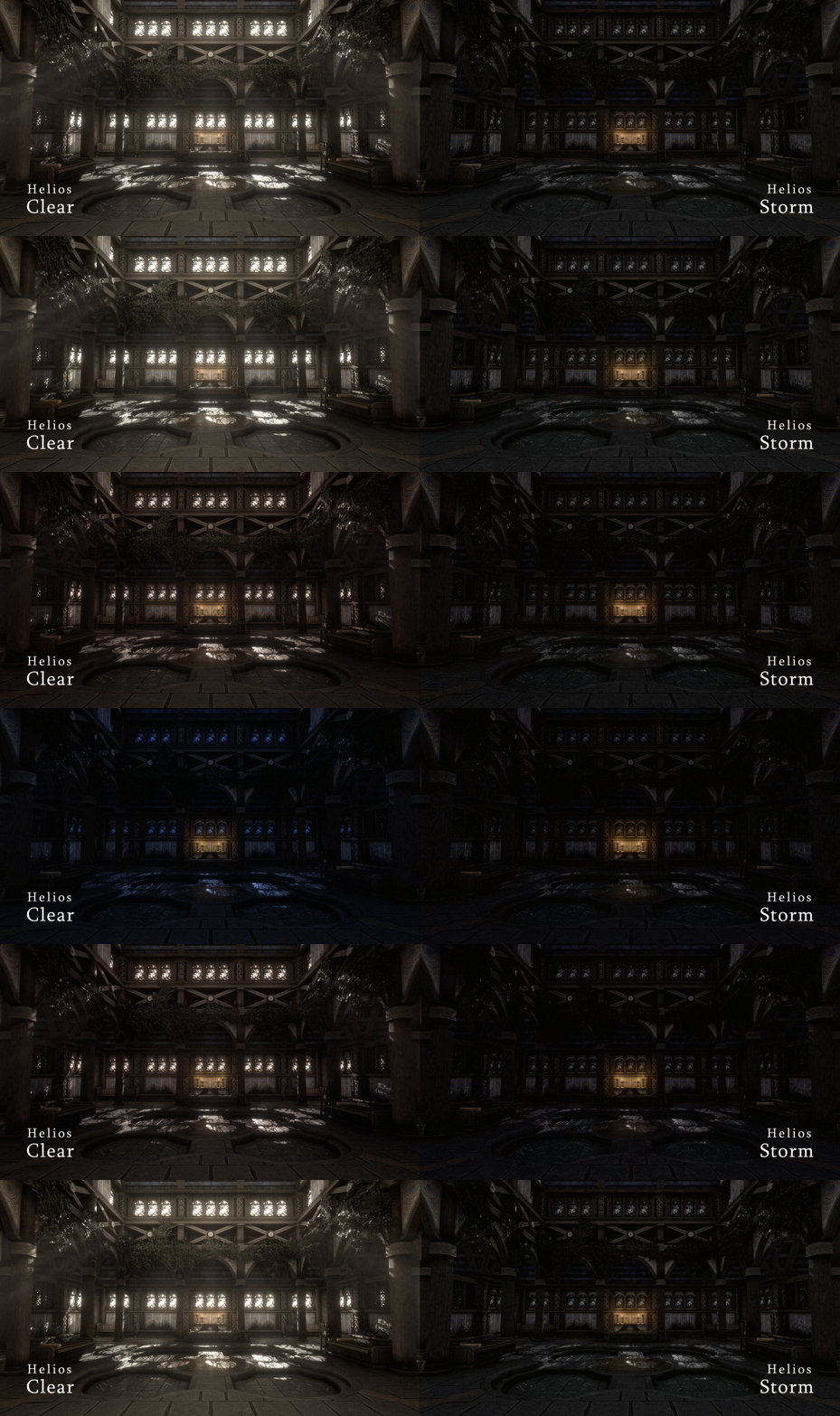
Helios adjusts the brightness and ambient light of interiors in accordance with the weather and time of day.
¶ Ambient Templates for Lighting Mods
For interior lighting, please check your brightness options in the FOMOD for Ambient Templates for Lighting Mods (higher percentage = brighter).
ATLM is incompatible with several lighting mods. Please review the mod page
¶ PBR Materials
Community Shaders supports Physically Based Rendering or simply "PBR" textures in the form of True PBR. PBR materials are well documented in modern graphics and are used in basically all modern AAA titles. In short, PBR unlocks finer control for artists to craft how their materials look in game.
In Skyrim, you can generally categorize PBR materials into mesh and landscape.
For landscapes, you must cover ALL of your landscapes with PBR or none. There is no mix and match with non-PBR for landscapes, otherwise you will get broken landscape textures. Some popular PBR landscapes:
- Vanaheimr Landscapes
- Vanaheimr Northern Roads (if you use Northern Roads)
- TMD Dirt Roads PBR (if you use TMD Dirt Roads)
- Faultier's PBR Landscapes
- TomatoRim PBR Landscapes
- ATHEUZZ Landscapes
For everything else, you can mix and match with non-PBR textures. You must patch your meshes with PGPatcher. There are a huge number of PBR replacers ranging from town overhauls to individual armors. Some popular PBR mods (many overlap):
- Enhanced Rocks and Mountains PBR
- Faultier's PBR Skyrim, Faultier's PBR Armors and Clothes
- Vanaheimr Mines and Caves, Vanaheimr Mountains, Vanaheimr Ore Veins, Vanaheimr Farmhouses
- Tomato's Riften and Ratway, TomatoRim Farmhouses, Tomato's Imperial Forts Remake, Tomato's Whiterun Remake, Tomato's Windhelm, Tomato's Solitude Remastered
- Vanilla PBR AIO
- Stony AF Markarth, Ancient AF Windhelm
The above mods are just the ones that are popular on Nexus Mods. Feel free to support less popular mods. You can search "PBR" to find a huge list of PBR mods. Be sure to check for PBR patches for any texture mods you have, a good place to start would be PBR Hub. For those looking to create PBR textures please look at our True PBR page and True PBR for Authors.
When adding PBR textures you must use the PGPatcher tool to properly patch meshes to use PBR textures. For a PGPatcher tutorial visit our PGPatcher page.
To ensure that there are no missing textures, please use Asset Doctor.
PBR textures also benefit from not-broken meshes, try Mesh Improvement Compilation for a start, there is an endless sea of mesh fix mods out there...
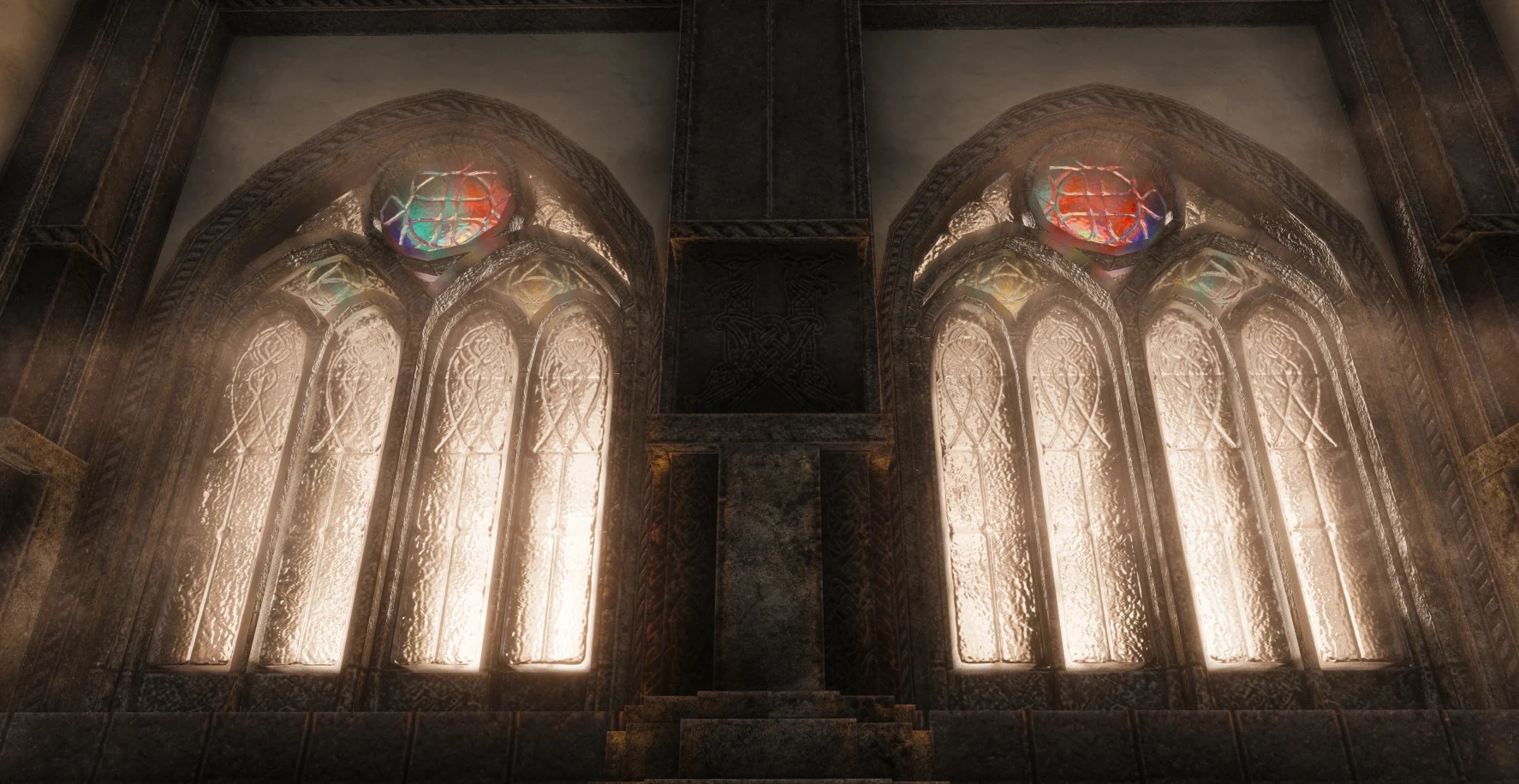
 Pictures from the Faultier's PBR Skyrim
¶ Recommended settings for PGPatcher
Disclaimer: The below image is for an older version of PGPatcher.
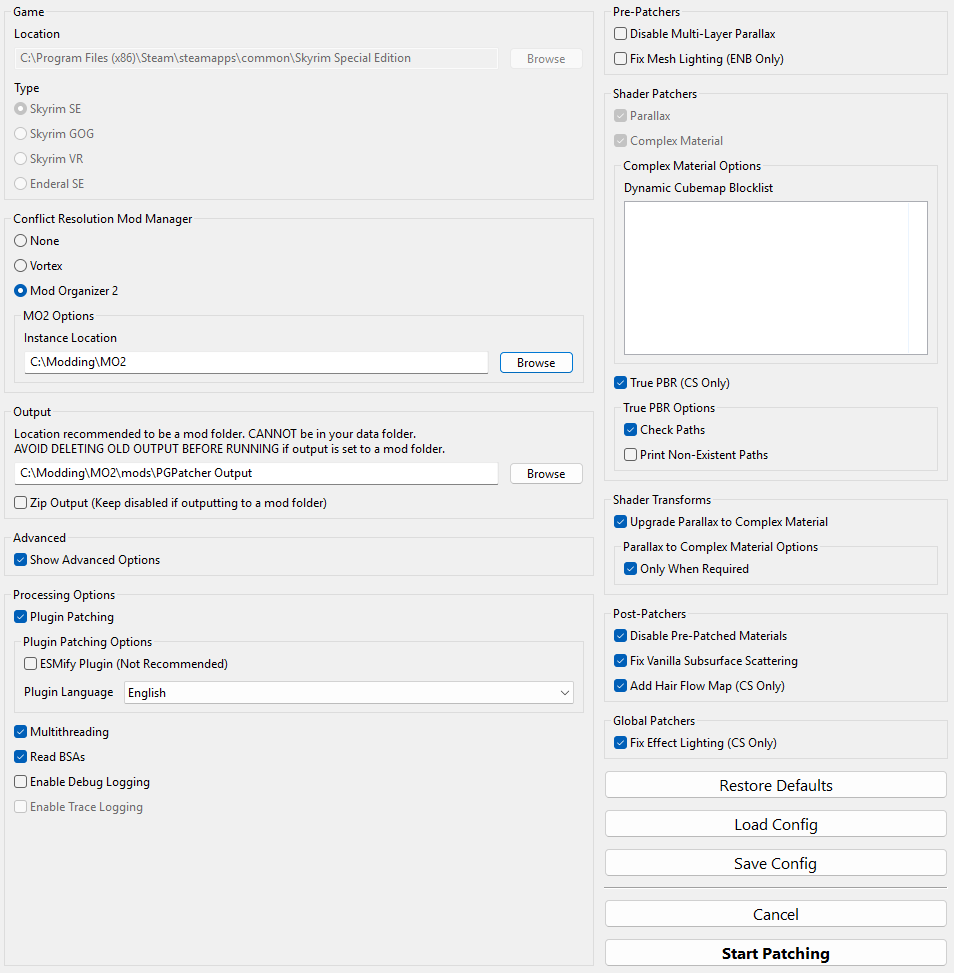
Please note that the Instance Location and Output paths here will differ according to your setup
To find your MO2 instance location, click on the folder icon in MO2 and select
Open Instance folder
¶ Acronyms
A list of common acronyms when discussing CS.
- SSS - Subsurface Scattering
- SSGI - Screen Space Global Illumination
- AO - Ambient Occlusion
- IBL - Image Based Lighting
- IL - Indirect Lighting
- FG - Frame Generation
- LL - Linear Lighting
- PBR - Physically Based Rendering
- PP - Post Processing
- DoF - Depth of Field
- CA - Chromatic Abberation
¶ Finishing
If you have any questions please check our FAQ or reach out in the appropriate channel on our Discord server
Happy modding!
¶ Contributing
Get involved via the GitHub Repository and Discord Server.