¶ Brief Synopsis
This guide will walk you through setting up the Community SDK for The Blood of Dawnwalker in a little extra detail.
The Community SDK provides a preconfigured Unreal Engine project that can be used as a starting point for creating asset replacement and Blueprint mods for the game.
¶ [Optional] Install GitHub Desktop and Git
If you don't already have these tools, installing them both with default settings can make downloading and updating the Community SDK much easier:
¶ Install Visual Studio
Visual Studio is required for compiling the Unreal Engine project and any C++ components it may use.
¶ Install Unreal Engine 5.5.4
The Blood of Dawnwalker uses Unreal Engine 5.5.4, so you should ensure you have a compatible Unreal Engine 5.5 installation available before opening the Community SDK.
If you don't already have Unreal Engine installed, it can be installed through the Epic Games Launcher.
Using the correct Unreal Engine version is important. Attempting to build or package mods using an incompatible engine version may cause errors or produce assets that do not work correctly with the game.
¶ Select Folder/Drive For Installing Community SDK
Create a folder as close to the root of your drive as practical for your copy of the Dawnwalker Community SDK.
For example:
D:\DawnwalkerModding
Keeping your development files relatively close to the root of the drive can help avoid issues caused by excessively long file paths.
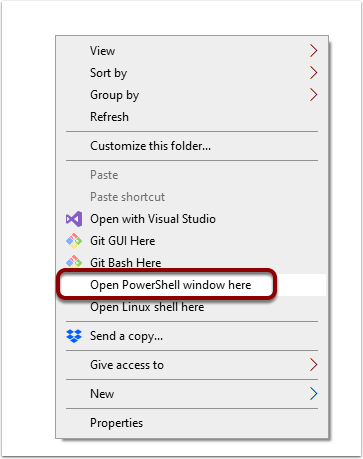
If you're going to clone the project using Git, right click inside the folder and select Open in Terminal or Open PowerShell window here.
¶ Clone Dawnwalker SDK With Git
To get the Community SDK, you can clone the repository using Git, open it with GitHub Desktop if you have that installed, or download a ZIP file from GitHub and manually extract the project files to your selected location.
If using PowerShell, run the following command from the folder where you want to install the SDK:
git clone https://github.com/Dekita/DawnwalkerSDK.git
When the PowerShell window returns to a new PS > prompt, Git has finished cloning the repository.
This can take a few minutes depending on your internet connection and hardware.
¶ [Optional] Rename Your SDK Project Folder
If you would like to, you can rename the downloaded DawnwalkerSDK folder to something else.
For example:
DawnwalkerModding
For the purposes of this tutorial, we will leave the folder named DawnwalkerSDK. Whenever this name is mentioned below, it refers to the folder containing your Community SDK Unreal Engine project.
¶ [Optional] Download & Install Wwise
The Blood Of Dawnwalker uses the Wwise plugin for audio files. If you would like to make audio mods, you should install this into your UE project. The exact version of wwise, according to the games plugin.manifest file, is 2024.1.14.9084.4216. Make sure you install the correct version to your project, with the correct engine version, or you will likely encounter issues.
¶ Download & Install Nexus Mods Author Tools Plugin
The Nexus Mods Unreal Engine Author Tools plugin provides additional tools for configuring and packaging mods directly from within Unreal Engine.
While the plugin is not required to use the Community SDK, it is recommended as it can simplify the process of packaging mods for distribution, and automatically uploading mods you need to update frequently.
¶ Launch Community SDK
The Dawnwalker Community SDK is a full Unreal Engine project containing dozens of modules. Before opening the project for the first time, these modules need to be compiled.
Unlike a simple content-only Unreal Engine project, the SDK does not include the generated Binaries or Intermediate files in the repository. These need to be generated locally on your machine.
The initial build can take some time depending on your hardware. This is expected and only needs to be completed when the project modules need to be rebuilt.
¶ Generate Visual Studio Project Files
Navigate to your DawnwalkerSDK folder and locate:
Dawnwalker.uproject
Right click Dawnwalker.uproject and select:
Generate Visual Studio project files
This will generate the Visual Studio solution required to compile the SDK.
¶ Build The Community SDK
Once the Visual Studio project files have been generated, open:
Dawnwalker.sln
In Visual Studio, set the build configuration to:
- Configuration:
Development Editor - Platform:
Win64
Build the Dawnwalker game target from the right hand menu.
The first build is a genuine compilation of the project's modules and may take a while to complete.
Wait for Visual Studio to report that the build has completed successfully before continuing.
If the build fails, do not attempt to continue launching the SDK. Check the Visual Studio build output for the actual compilation error, as this will usually provide considerably more information than Unreal Engine's module rebuild prompt.
¶ Open The Community SDK
Once the SDK has successfully compiled, return to your DawnwalkerSDK folder and double click:
Dawnwalker.uproject
The project should now launch normally in Unreal Engine 5.5.4 with the reconstructed classes available and their references intact.
You are now ready to start creating mods for The Blood of Dawnwalker.
Note: Unreal Engine may offer to rebuild the missing modules automatically if you attempt to open
Dawnwalker.uprojectbefore compiling the project. The editor's automatic rebuild is unreliable for a project of this size and may fail with a generic "modules could not be compiled" message. BuildingDawnwalkerEditordirectly through Visual Studio is the recommended setup process.
¶ Optional Recommendations
There are a few Unreal Engine settings and checks that can make working with the Community SDK more convenient.
¶ Test Packaging
Package a simple test mod before spending significant time developing your first real mod.
If there are problems with your development environment, Unreal Engine installation, plugins or project configuration, it is much better to discover them now than after spending hours creating a mod.
¶ Open Asset Editors In Main Window
In Editor Preferences, find Asset Editor Open Location and change it to Main Window.
This prevents Unreal Engine from opening a separate window every time you edit an asset.
¶ Automatically Save Blueprints
Open any Blueprint and select the dropdown next to the Compile button.
Change Save on Compile to either:
On Success OnlyAlways
This means you won't need to manually save the Blueprint each time you successfully compile it.
¶ Keep The SDK Updated
The Dawnwalker Community SDK may be updated as more information about the game is discovered or when game updates require changes.
If you cloned the SDK using Git, you can update your local copy using:
git pull
Run this command from inside your DawnwalkerSDK folder.
If you have modified files supplied by the SDK, pulling an update may result in Git conflicts. Consider keeping your own mod content separate from SDK files wherever possible.
The intention of this guide is to provide a starting point for new players and modders, and encourage the growth of community-driven documentation, tutorials and resources.
Please consider contributing if you have additional information that could benefit the wider community.