In this page we'll be guiding you on how to build a collection page that looks like a well-built game page on Steam rather than a wall of text. We'll be giving examples from best practices and then we'll also give you some practical ways to achieve these via Collection Page Asset Templates that is built-in curators toolkit.
As mentioned in the introduction & successful collection checklist part, we'll separate this into 3 parts moving forward. Page design, documentation and support & community building. Each part is equally important but feel free to skip any of the parts you deem necessary.
¶ Part 1: Page Design
¶ A) First Impressions
When you are designing your page, think like you are designing a Steam page for a game instead of a “list of mods”. First, we’ll focus on the first impressions. Users will decide within a minute whether your collection is worth installing or not, so in under 60 seconds, your objective is to:
- Capture attention quickly
- Tell your story
- Build trust
A typical user journey includes a user checking out the first video or two on the images section, then scrolling through the page a bit and lastly checking the comments section. So here are some great tips on capturing attention along the user journey.
¶ Create a "Hero" section for your collection page
First section of your collection page should be unique and stand out from the rest of your page. This is where users will decide to spend more time or not on your collection page after all.
In this section we'll set the atmosphere and in a way make users smell what is going on. This is where you shake hands with the user, so here you have to tell them who you are. This is a great place to tell what your collection is about in 5-10 words at most, set up a cinematic / visual background and let them know what your identity is.
Here are some best practices from multiple different collection pages:
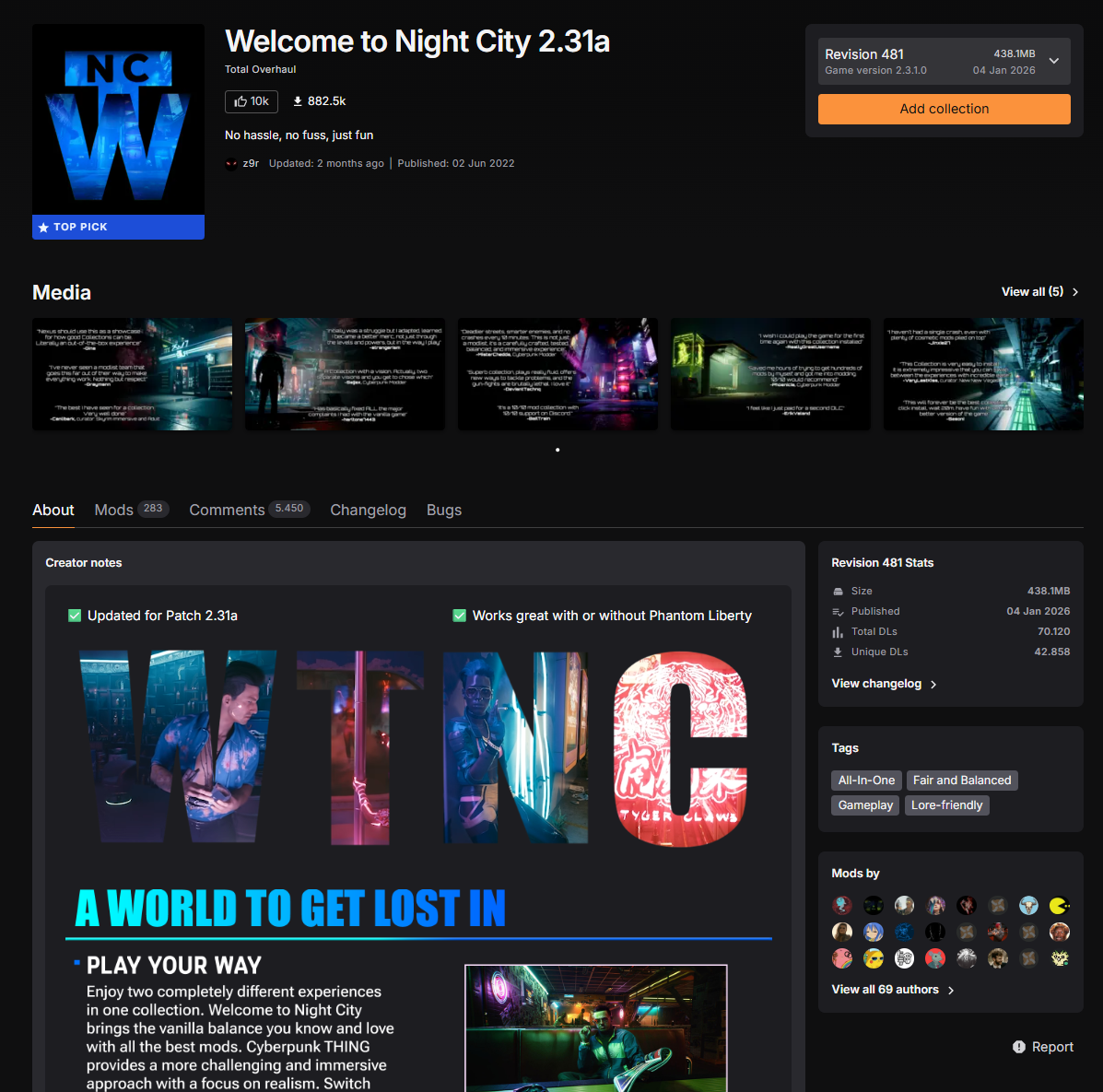
Example - Welcome To Night City (Cyberpunk Collection) Link
Notice how this collection page attracts attention at the very first second, via the hero section. In this instance, we see the "slogan" or the "identity" of the collection right away, both with the "A World To Get Lost In" wording and also with the atmosphere. When you read further, you also see the 4 main reasons to give this collection a chance. You too can feature high quality GIFs and visuals like this using our curators toolkit's Collection Page Asset Templates
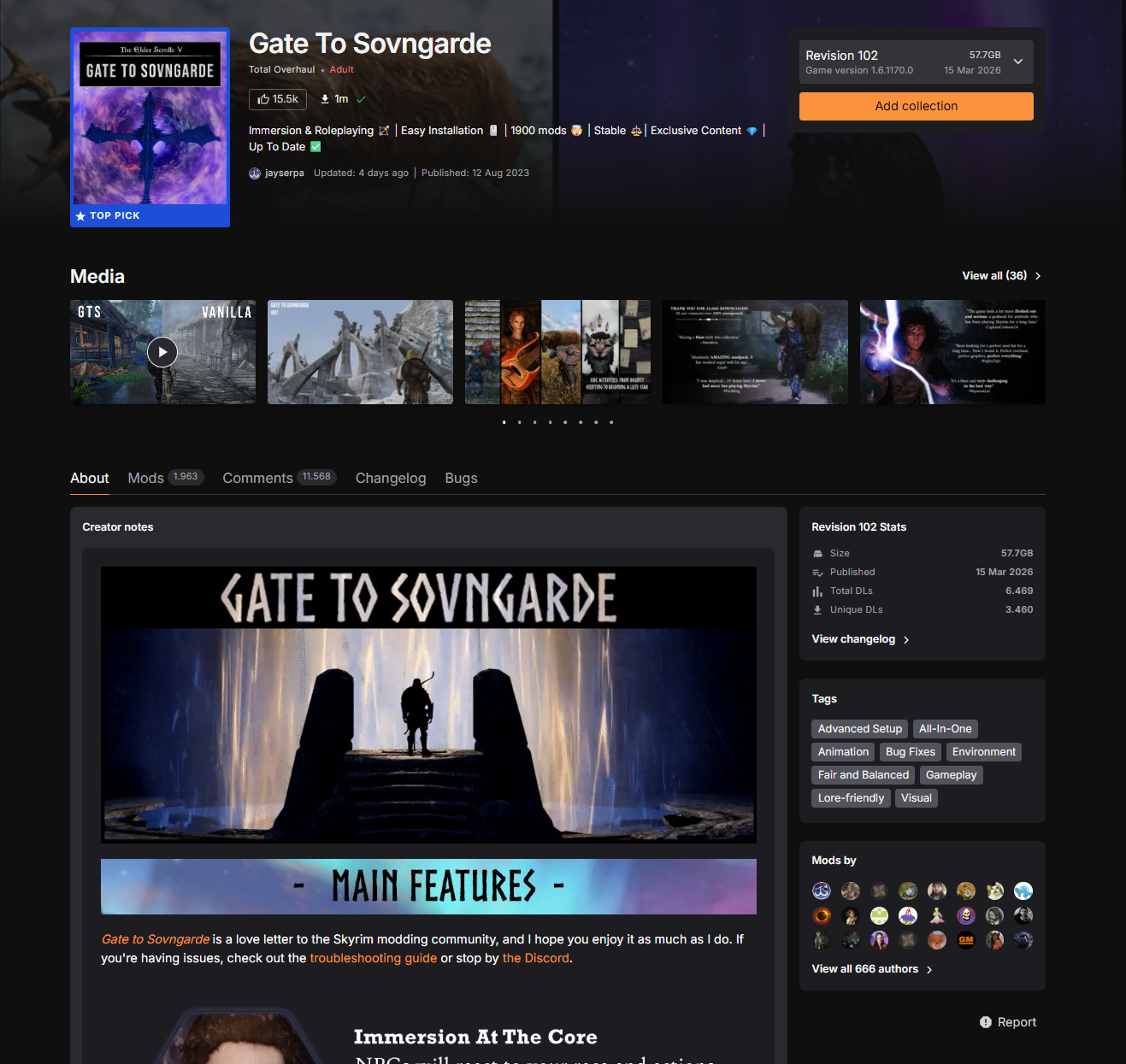
Example - Gate To Sovngarde (Skyrim Special Edition Collection) Link
Notice how the curator sets up the atmosphere right away and captures attention instantly. You see the identity of the collection both on short description at the very top, right next to collection artwork cover, and also right on the main description section. This example also uses the images section in a way that you may be already familiar from steam game pages. Starts with a video, continues with some "reviews" and then showcases in game gameplay screenshots.
¶ Feature A Video
You don’t always have to feature a professionally edited video but consider at least showing what the actual gameplay looks on your end. Sometimes mods are harder to showcase especially if your mods do not focus on visuals, so consider separating the video into small bites with timestamps and titles if you need to.
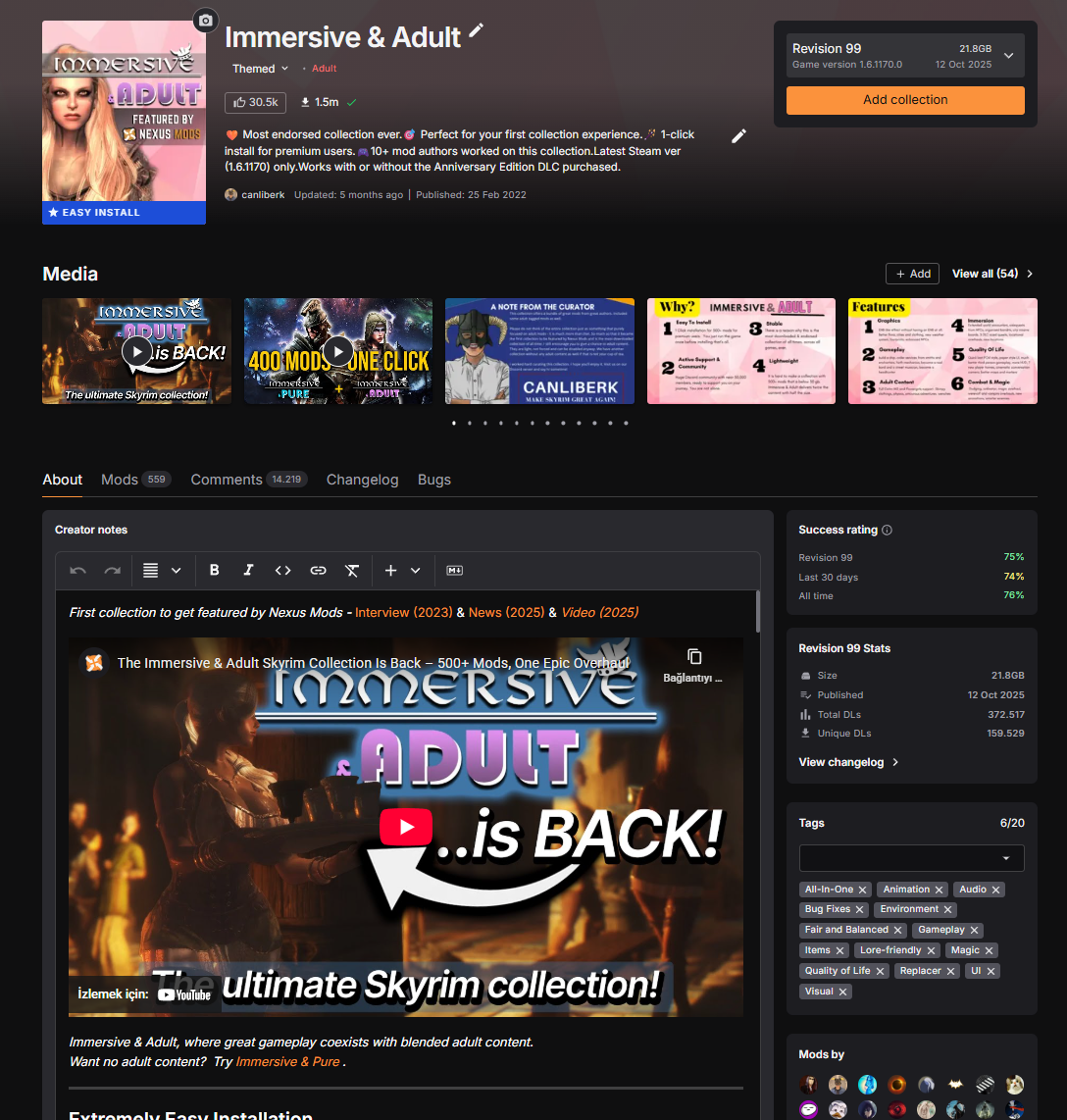
Example - Immersive & Adult (Skyrim Special Edition Collection) Link
Well I couldn't write a guide and not include my own collection as an example at one point, right? But seriously, the reason I included this as an example is simply. I think I am using the Media section in a very organized way and I think it is working well so far. I am also featuring multiple review & gameplay videos along the way, which is often what users will look out for.
¶ Use Custom Titles and GIFs To Spice Up Your Page
Take a look at some of the most popular steam game pages. You’ll probably see custom titles and headers all along the page, with some GIFs spread around here and there. If you don’t know how to do any of these, don’t worry, curators toolkit is built just for that. Take a look at Titles, Headers, GIFs sections on curators toolkit from this link
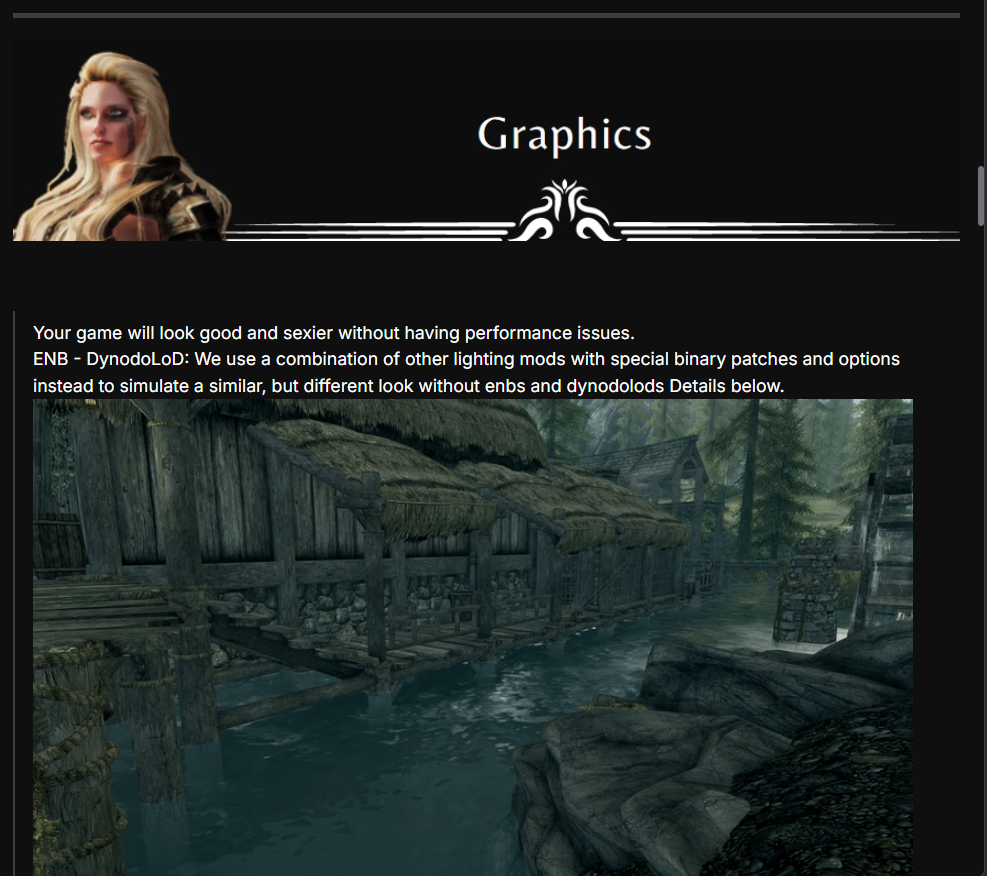
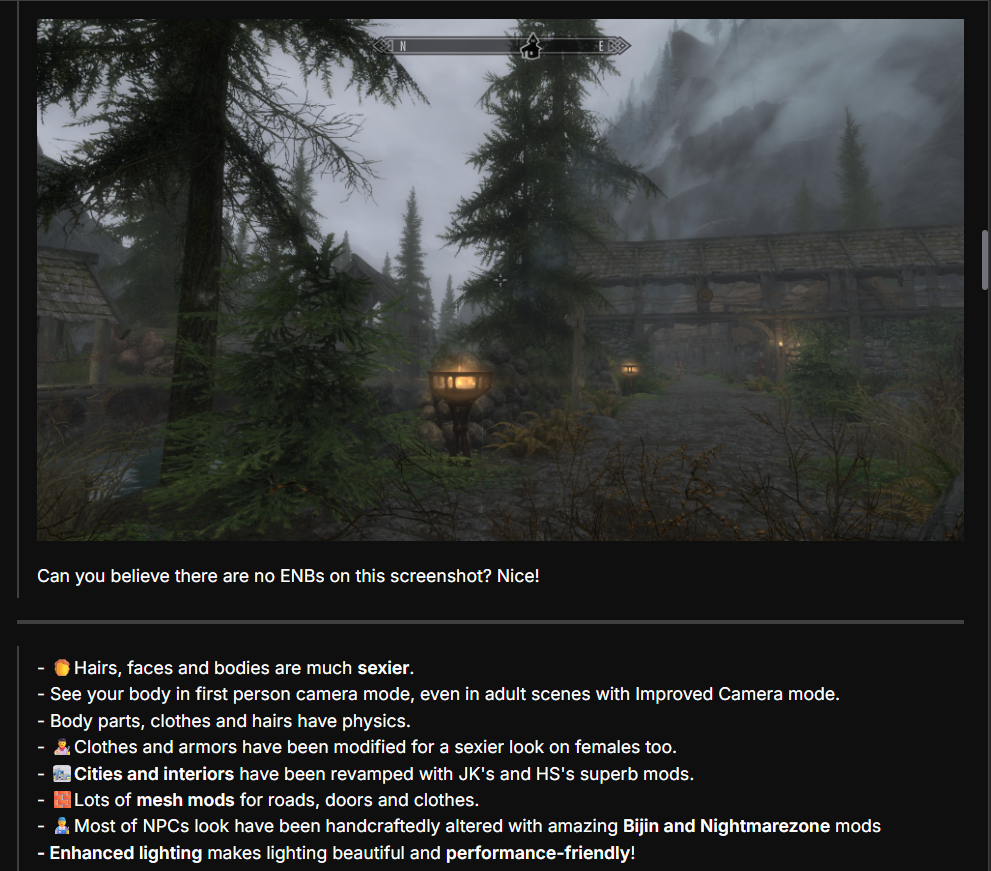
Example - Immersive & Adult (Skyrim Special Edition Collection) Link
Notice how the page is separated into small sections, each dedicated to one part of the collection. In this example, custom titles are used in tandem with a GIF, a static screenshot, short text description and then bullet point descriptions with GIFs. It basically uses all elements that you should be using on your collection page in all sections one by one. Just like a steam game page would.
¶ Define Your Edge
You have to stand out from the crowd. Just saying that this collection is great and stable won’t convince people.
Stay away from broad terms like: “Enjoyable, most popular mods” or try to stay away from ultra used words without having anything to back it off like “Stable and good looking collection that i tested”. Instead, focus more on targeted claims like: “A performance friendly collection designed for lower range PCs” or “A 2026 visual upgrade without gameplay changes”
When talking about what makes your collection unique, focus on at most 6 claims, ideally even less. If possible, back all these claims and show it to your users with visuals as well.
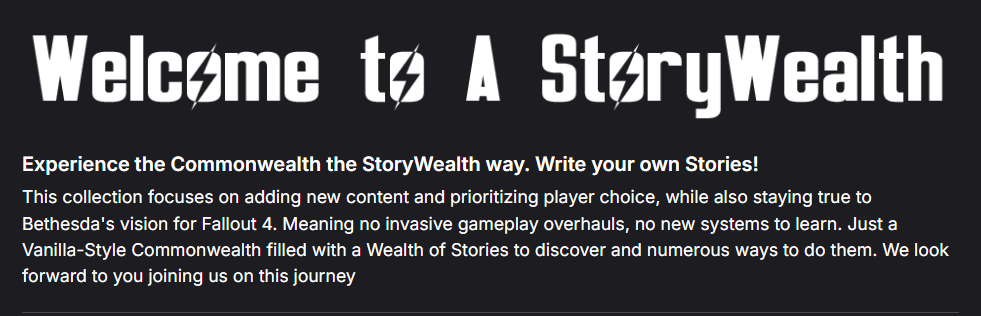
Example - A StoryWealth (Fallout 4 Collection) Link
Notice how this short introduction sets the collection's main theme right away and more importantly, it says what is not to be expected from this collection.
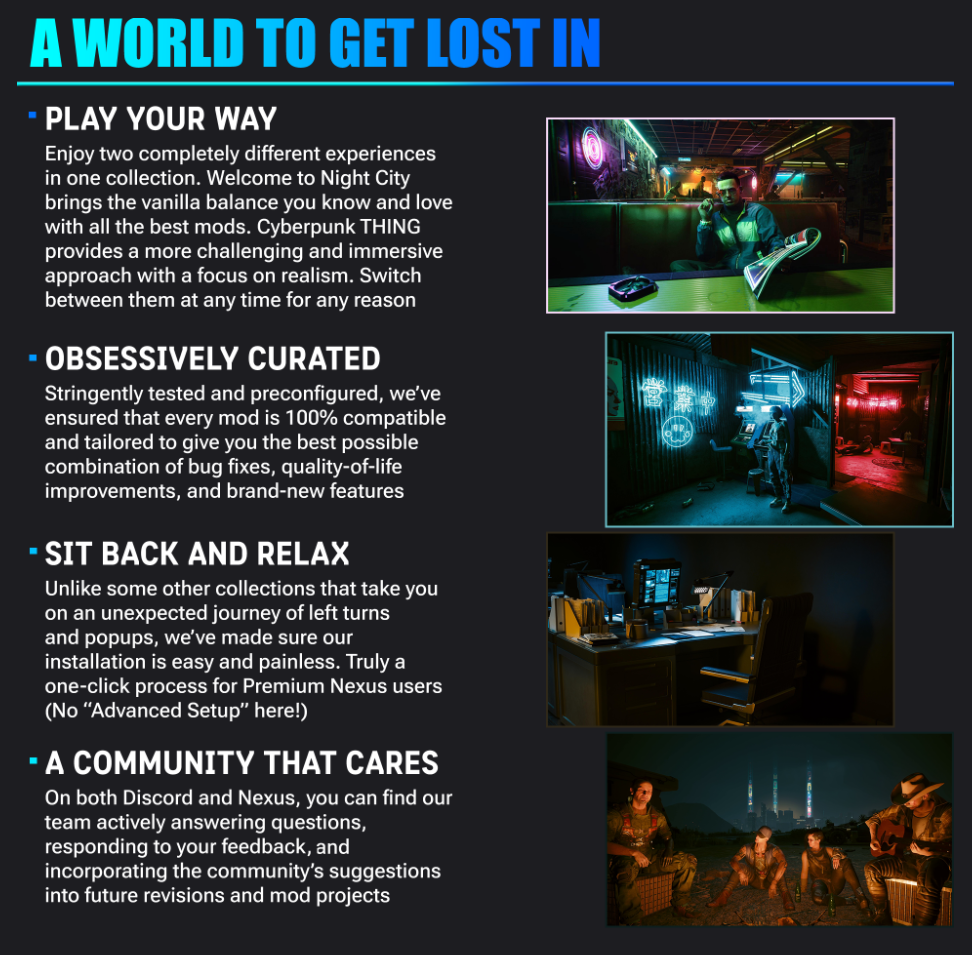
Example - Welcome To Night City (Cyberpunk Collection) Link
We are back with Welcome To Night City as an example. Notice how this collection sets itself apart at the very beginning, and builds the foundation for that in 4 pillars.
¶ Build Trust
Collections can sometimes be time consuming, especially if the users do not have Nexus Premium. So, naturally, if they are going to be investing either their time or money, they will want to see something that gives them TRUST.
How do we build that trust? By showing that you are an active curator, possibly with an active community backing you up. You do not always have to form a Discord community for your collection, though it certainly helps and you can learn more about it here on “Supporting Your Users” section. You can usually show this by answering all comments on your comments section yourself, pinning a comment about how people can reach you out, resolving as many bug reports as you can, and showing that you are reachable on the collection page in the first or last sections if possible. If all that sounds complicated, don't worry, we'll be discovering the support section in depth later along this page.
You can do this in many different ways, here are some best practices that you may find useful.
Example - Immersive & Pure (Skyrim Special Edition Collection) Link
This is from Immersive & Pure, one of my collections and I really think i am doing my best to build trust here with this GIF, showing both how they can reach me easily and what else they can find if they happen to join my server and how they can solve their problems.

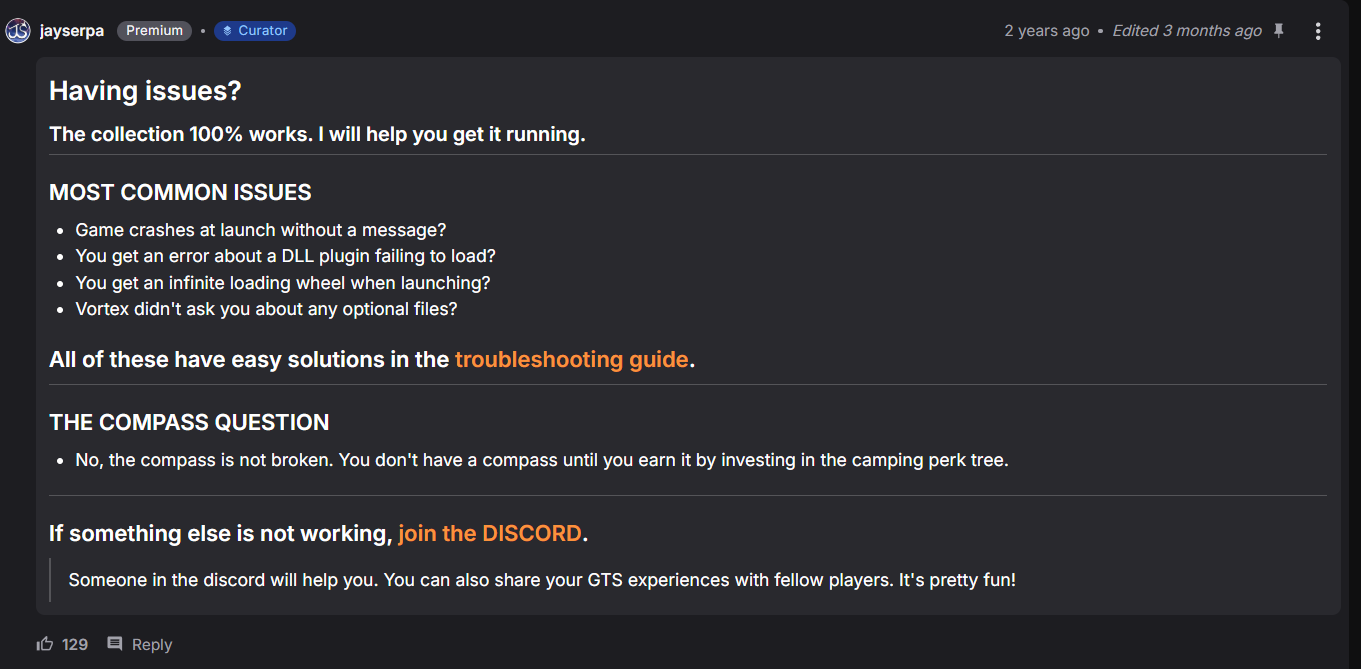
Example - Gate To Sovngarde (Skyrim Special Edition Collection) Link
JaySerpa uses the comments section of his collection and provides a pinned comment, showing some paths users can follow if they happen to encounter a problem, along with how he'll be helping users himself. This not only builds trust, but also increases the likelihood of users who had problems with this collection to solve their problems with the provided troubleshooting guide, hopefully before they write a negative comment about the collection.
¶ Tell Your Story
So far we’ve talked about everything that has to do with the collection, but we skipped probably the most important part. You. Even though I could have included this section with the previous one, I wanted to make it a separate one for a reason.
What motivated you to curate this collection? How did you learn to mod? Do you have a team, or do you work solo? Are you already a mod author / content creator, or did you just start as a mod user and you wanted to help out others? Do you have a community or a place you like to hang out online like Nexus Forums or your own Discord server.
How did this collection’s journey start? How is it going now? What are your future plans for the collection? How do people playing your collection react?
It is one thing to list all the features of your collection, but it is another to show that this is still being worked on and you are active and reachable.
You do not have to stick to the description section of the collection page for this. Sometimes you can also use the images section, or even the comments section. We’ll review the examples below.
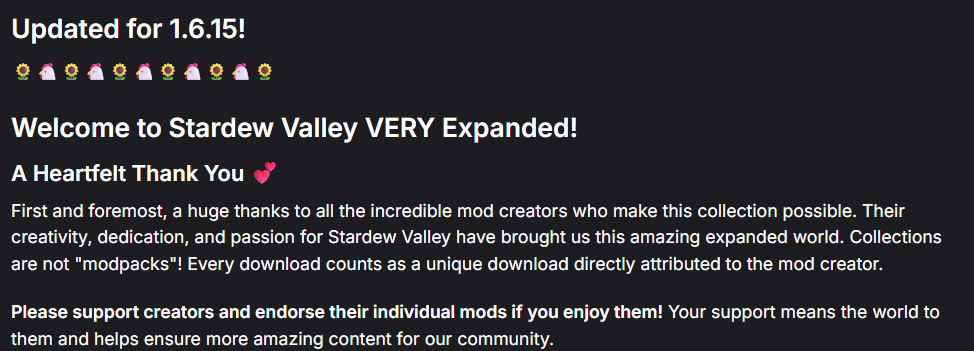
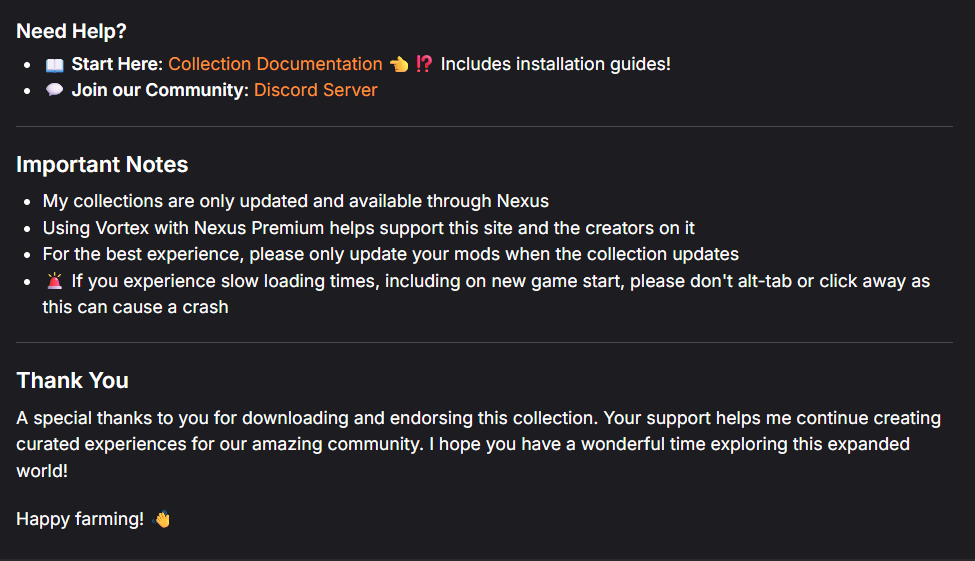
Example - Stardew Valley VERY Expanded (Stardew Valley) Link
Notice how the curator builds both trust and a personal connection here, both at the beginning and at the end. You can clearly see that there is a real person working behind all these, putting all their time and effort into this and this is a great way to establish and grow your community as well
¶ B) Visual Consistency
Think of visual consistency as a museum hall that is decorated with artwork. A well curated museum would not include the skeletons of a dinosour and a Tank from the second world war in the same saloon. Ideally you want all these artwork to be at least somewhat related to each other.
For visual consistency, you want to continue with your story to an extent. If your collection is focused around, let’s say, high quality visuals, all your collection page should tell the same story. Consider using titles, screenshots and GIFs that are showcasing this on every opportunity. If you are focusing on survival mechanics, adapt your titles as well and perhaps add some lore-friendly characters here and there making camp even in the corner of the title. See the best practices section for more.
Spacing also plays a significant role. Dense formatting will simply confuse your users. If multiple large GIFs or headers appear back to back without structure the page can feel exhausting rather than engaging. So, always mix all elements up when designing your page. For example, a title should be followed up with a subtitle and then a GIF with an explanation and then some features in bullet points, then you switch to another section.
A collection page should appease the eye and guide the user seamlessly. It is important to understand that most users do not read collection pages from start to finish. They scroll quickly and do a quick scan, pause when something catches their attention and move on.
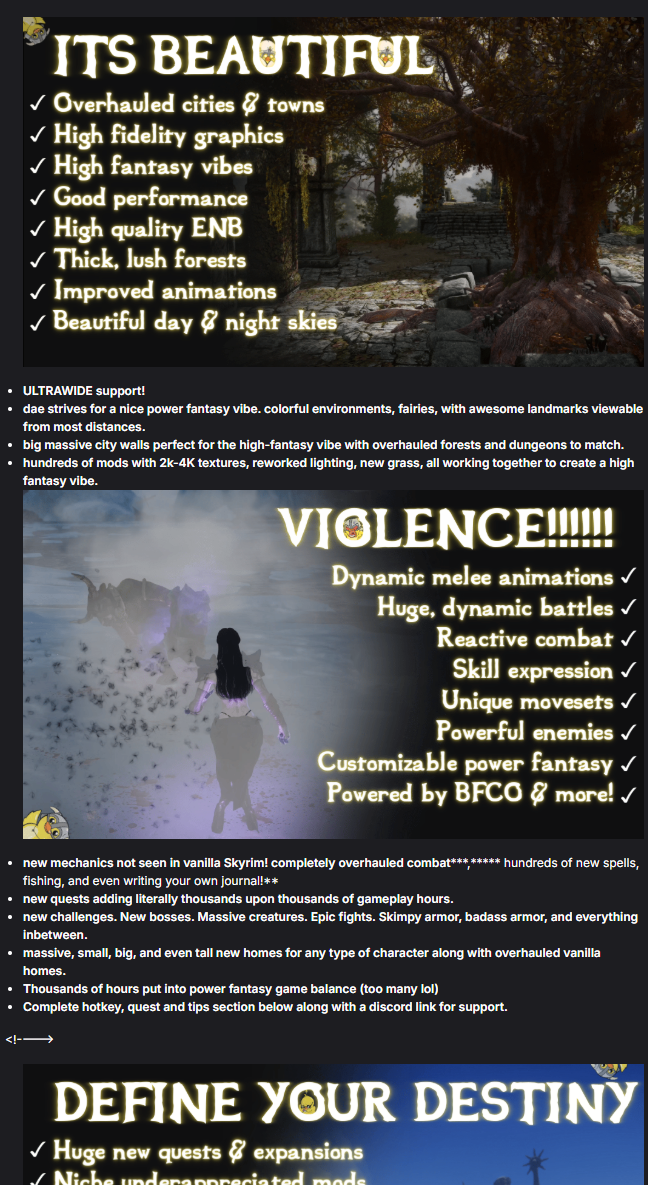
Example - DOMAIN: An AE NSFW AIO pack by dae LINK
Notice how you can scroll through this page easily, and notice some quick bullet points integrated right into the GIFs in the collection page. While scrolling, you'll have a very good idea about what this collection offers without doing an extensive reading.
¶ Part 2: Documentation
This part goes hand in hand with the design part, but includes more than just overall visual consistency and design principles.
When users browse through collections, they are basically choosing something to invest in as they are either committing time or money so it is a big deal for them. If they feel unsure or if they can’t find some of the fundamentals, you may lose these users even if you succeeded to attract their attention in the first place. This is overall a worse experience for both you and them.
A strong collection page should follow a logical order and should include answers to some frequently asked questions. You already start with a draft template when you first create your own collection and it is a good one for starters. You may want to adapt it to your needs as you improve things however. The draft template includes: Description, Main Features, Requirements, Recommended Specs and Compatible Collections. If you are curating an “add on” collection, it will work perfectly fine. Let’s take a look at one of the examples right away. For my collection Immersive & Adult, this is more or less the structure I follow:
- Hero Section
- Why This Collection?
- What Is Included?
- Graphics
- Gameplay
- Quality of life
- Detailed Instructions
- Installation & Update & Uninstallation Instructions
- Troubleshooting & Modding the Collection Instructions
- System Requirements & Credits
Now let's break it down into pieces.
¶ 1) Hero & Introduction
We start with a strong "Hero Section" as discussed in the design part and continue with "Why This Collection" but notice how these sections are very small compared to the rest, but still built with a lot of attention. This is done on purpose, as +80% of users will spend their time there. You should mention these things in the hero & introduction parts 100% of the cases:
- What is unique about this collection
- Can this collection & you be trusted
- Quick showcases
We discussed these parts on the design section in detail, and the documentation section of this guide is more about providing guidance on other, detailed parts, so we are going to number 2 now.
¶ 2) Feature Details
After you demonstrate yourself and set up an identity at the beginning, it is time to give more details, hopefully in a user friendly way that won't lose users attention. You could technically write this part with just a plain wall of text but as discussed in the design part, this part should be mixed with GIFs, titles, headers and GIFs in such a way to spice the page up.
Here try to categorize some of the features of your collection. For example if it is based on survival mechanics, create a separate section for that. If it is focused on visual improvements, open multiple categories for both lighting and texture mods. In my own collection, I used different categories for Graphics, Gameplay, QOL, Adult Content, Combat & Magic and created sections for each one. For each category, I used a thematically accurate title, wrote a short intro, featured a GIF and then counted some of the features in bullet points. For your own collection, you can do something similar for each category as well.
¶ 3) Instruction Details
Users will usually come and read this section after they made up their mind, but it is still important because an unhappy user who could not find a crucial instruction is much worse than an user that never decided to install your collection to begin with.
This section should include things like installation, uninstallation, update instructions, different accomodation instructions, troubleshooting and more. Luckily for you, we included pretty much all of these things in curators toolkit in a ready to use format, so feel free to use that as a guidance when you can.
- Installation Instructions:
Try to keep it short but still detailed enough. Try to visualize it if possible via videos or at least images. You can use what we offer in curators toolkit, or create your custom one like shown on these examples (Immersive & Pure)
- Update Instructions:
What should your users who already installed your collections do when you publish a new update? Most of them won't take a look at your changelogs to read what changed and what not. You can use what we offer in curators toolkit, or write your own one.
- Gameplay Instructions:
Depending on what kind of changes you are doing on your collection, you may want to give a tutorial to your users. Some collections do it differently and use in-game tools to give tutorials, and some collections create their own wikis or discord servers with guides. This part is pretty open to creativity and it will change heavily on what your collection is about. If your collection is simply a collection of 10 player houses, you can just explain where these houses are located, but if your collection is a vast, all-in-one collection you may want to go for different routes.
- Hotkey Layouts:
You may assume that everyone who play your collection will already know all about controls, but some of them will be total newcomers to the base game itself as well, so try to feature a hotkey layout somewhere convenient. You do not have to do it on the collection page and can just feature it in-game with load screens and such, but if you have no such option, do it here.
You can use curators toolkit to just create yours with a ready to use template now.
- Uninstallation Instructions:
If there is any special uninstallation instructions, you can specify it here, but if there are no specific uninstallation instructions you can just copy paste the template given on the curators toolkit here.
- Modifying The Collection Instructions:
Is your collection compatible with other mods? If so, how? Can users remove / add certain parts if they want to? This part is extremely open to customization, so there won't be a template given for this section but you can take a look at Immersive & Adult or Immersive & Pure collection pages to get an idea.
- Accomodation Instructions:
- Ultra wide screen compatibility
- Controller compatibility / layouts
- Other system compatibility information if there is any
You may not realize it when you are just playing your collection on your system, but a lot of people have different hardwares and their needs are widely varied. It is a good idea to offer some accomodation to these users and I do understand this may be harder in some cases, so we tried to pack some ready to use assets for controller layout templates on the curators toolkit.
- Troubleshooting:
It is a good idea to dedicate a section for most commonly seen errors and troubleshooting steps. You won't need this part with really small, thematic collections but it is a good idea for big collections to include one instead of forwarding people to other external resources.
¶ 4) Others
Anything that don't fit into previous categories should be mentioned here. Some collections do like to feature their youtube channels or Discord servers, some like to feature a live twitch stream and some just like to feature a section about how you can support the curators.
¶ Part 3: Support
¶ Support
In the previous sections we talked about how important it is to establish trust and show that you are reachable. In this section, we are going to show you not only how you can do all that, but also how you can build a community around your creations.
We are going to be separating this part into 2 sections. First, we'll learn how to handle the day to day questions and support and then we'll provide some best practices about how to build a community, which we will be supporting with some ready to use assets from curators toolkit including entire discord server templates built for collections.
¶ 1) Handling Day To Day Support & Questions
Users will naturally have some questions every now and then. We'd want to somehow answer these questions even before they are asked, or at the very least receive these questions in the correct places if we can. If we can't, users will try their luck in some other place that you may not even be aware of and that's usually bad for all parties. For example, if you don't put out any guidance out there, some of these users may find their way into some random discord servers or subreddits and ask questions about your collection there. There is no real harm in asking questions, but if they ask a crucial question in a place where there won't be anyone knowledgable, not only they won't be receiving any answers any time soon and get frustrated, but you are also be getting a bad general outlook and bad word of mouth about your collection in most cases.
First, let's take a look at all the preventive measures we can take to answer these questions even before they are asked. You have your collection page and it is pretty much where users will start looking for answers, so let's start there.
- Correctly Document Your Collection Page
As discussed on the Documentation section, putting Instruction Details that include sections like troubleshooting, how to modify the collection, how to accomodate different needs, hotkey layouts and such will help you and your users massively in the long run.
Collection page however is not your only source and what we want to do here is somehow build your user journey in such a way that users learn about all these things naturally throughout their journeys. You can achieve this in multiple ways, first, by putting instructions on your Collection via Collection Workshop, second, by putting instructions on some mods individually on Collections Workshop, third via in-game elements like putting a load screen which shows hotkey bindings or by even putting a NPC / book that is designed for the collection that explains everything in game. So don't just rely on the collection page for this, think in a wider way and utilize other tools in your arsenal as well, but also don't forget to put some information on the collection page just in case users look there.
If putting a troubleshooting section etc. makes your collection page way too cluttered, you can use collapsable sections just like i did in this example on Immersive & Adult and Immersive & Pure collections.
- Use Comments Section Logically
Some users will find their way into comments section naturally, but others will come there directly via Vortex as there is an option that guides them there if they click on "No" button for the prompt that asks if that collection worked for them or not. So there is a pretty high chance someone visiting your comments section to be an unhappy user that clicked on "No" for your collection, and this is your pretty much only chance to transform that experience into a positive one.
So first, use the pinned comments for your advantage. Take a look at both my collection Immersive & Pure and Jayserpa's collection Gate To Sovngarde. Notice something similar? We both have a pinned comment that shows users ways to troubleshoot their games directly themselves, and also some instructions on how to reach us if all this fails for some reason. This is crucial, as this will probably eleminate some of the most commonly asked questions right away and your pinned comment could fix someones setup in seconds.
Second, you can use the comments section in a way that showcases some of the best reviews for your collection, too. Taking a look at the "Domain" collection, you can see how he uses some of the first comment slots for positive reviews. This will paint a much better picture for users who come there before even installing the collection.
Third, being active on the comments section is super important. People will try to scroll or search through other comments if they have a problem and they will notice an active curator answering all comments every single day and they will appreciate this a lot.
Lastly, I understand that not all comments will make sense. Sometimes you won't know the answer and sometimes users are just built different and their question may simply be designed to trigger you in a way. My advice is to not shy away from replying all comments either way. If you don't know something, there is no shame in telling it. You are after all a single person or a part of a small team and people can not expect you to know if your collection will be compatible with some random mod that you never heard of before. If you are answering these other comments that are not written nicely, perhaps about a bad experience an user may have had, no need to drag things too long, just say sorry things did not work out for them and you'd be open to support them personally if they change their minds. You are not diminishing yourself by saying sorry here, you are actually showing respectful behaviour and recognizing their frustration. If the bad attitude continues and perhaps goes for way too long to ugly extents, it may be time to report the user if it is violating rules anyway.
- Use Bug Reports Section Logically
Bug reports section is usually not seen as the first thing and most users who visit that place are coming from Vortex after they click on "No" button for the prompt that asks if that collection worked for them or not. So apart from comments section, this is your second chance to fix a wrong or just make someones day better by providing your expertise and support.
First, a bug reports section that is filled with hundreds of open bug reports paints a bad picture. It is okay to have some open bug reports, and you can even intentionally leave some open yourself to announce that there are some known issues but having more than 10 just paints a bad look and it shows that you may not be around much, even if that's not the case and you are instead offering support somewhere else.
I understand that it is not always easy to handle all the bug reports, since some users just write extremely bad reports and some users just ask same questions over and over and such. No need to panic, it is hard to deal with people everywhere and this is no different.
Here is what I do for my collections: If i receive a bug report, I try to answer it in a day. Sometimes it takes longer, since life happens but that's my general way of working. If the bug report is pretty much empty apart from the title (happens more than you think) I ask the user to fill the report template as best as they can since it won't be possible to hold a conversation this way. If the bug report is missing some other details, you can also ask for these details. If you can resolve the bug, that's nice. If you can't resolve it, feel free to say sorry and categorize it as a known bug that you'll fix later or just categorize it as "won't fix" if this won't be a priority anytime soon. Often times, users who get their bug reports resolved won't close their reports themselves, so if you can not receive any answers whatsoever for an extended period, you can usually assume that their report was resolved - if that's the case I usually write a comment that acknowledges that saying something like "Hey, I didn't receive a reply for this comment for x amount of time and it is still standing open. Since I haven't heard back from you, I'll be closing this report but feel free to comment here, I'll still be around to see it with a notification and can open the report if it's not resolved"
¶ 2) Building A Community
Even though this is totally optional, it plays a big part on how well your collection will do in the long run and in my honest opinion this is probably the hardest part of being a collection curator. The difficulty about building a community is no doubt the amount of time and energy it requires and especially starting from scratch solo could feel like playing a game in the nightmare difficulty settings.
We can dedicate an entire wiki on how to build healthy online communities and there are even some full time jobs just doing that, so for the sake of this guide and my well being I'll try to limit the topic a bit.
We'll be building a community for multiple reasons. First, it is certainly beneficial for you to do so because at the end of the day you'll want a follower base that is interested in your creations that could perhaps support your future projects. Second, it is certainly beneficial for users to take part in it because they will be able to see troubleshoot their setups, expand it even more, get new updates
¶ Choosing The Right Platform
First, let's address the elephant in the room. Even though it is perfectly possible to do this in any platform, Discord is pretty much the most preferred platform for building & engaging a community around collections since it allows people to post screenshots, discuss mods, voice chat together and troubleshoot problems all in the same platform. I used it myself for my collections and it is fair to say that it worked pretty well. I started from scratch and after some years and lots of effort and time, the community grew pretty big and I have about 60.000 members in my community. There have been definitely some things that I could have done better, but I am here to share my experiences, good and bad with you so you can do even better.
Some people don't use Discord at all and solely build their audience on Youtube, Twitch, Instagram or Twitter and before all these platforms forums were the most frequently used spaces so I fully recognize that it is possible to do all this in a variety of ways. If Discord is blocked in your country or if you don't agree with the way they are working due to some reason, that's understandable, try to apply the stuff I explain here to any other platform as best as you can and you'll do fine for the most part.
Even Discord itself will not be well suited for everything, even though you can handle many things with it. Also you'll miss out on all the users that are not using Discord at all. So if you can, try to maintain a slight presence on other platforms that your users may exist too like reddit, Youtube and such. I know that it is often not possible to maintain presence in all of the platforms all at once, even if you do this full time, but even if you can not be active on all these platforms, just having a channel or a dedicated place there will prevent users from wandering to wrong places.
If this is your first time starting though, no need to wander way too off just yet and we can stick Discord for now, at least until you feel comfortable expanding. This is going to be the main tool we are using in this section too as well for convenience sake.
¶ Structuring Your Community
Now that you decide to do this and picked the right platform for you, let's structure it properly in a way that makes sense. I have uploaded some cool assets in curators toolkit for you including a ready to use Discord server template with some instructions on how to modify it even further.
We want to link your collection page and your chosen platform together, so use links on your collection page that would refer users from the collection to your Discord server. You can even use some assets from templates for this so the invitations look even more appealing. You can alternatively use invitation links even on Vortex instructions, so users can visit your Discord server while the installation takes place, hopefully to read about what they are getting into or about some questions they may have about the installation.
If you are starting from scratch, it is usually a good idea to find some good examples you can look up to. You probably already have some favourite content creators. Try to look at their social presence in a different way this time and see what they are doing and what they are using. For this example, I will try to use my own experience in my own server, Immersive Collections Server.
In my experience, offering these channels below are crucial in your community. You can expand it even more, and in fact the template I provide is a lot more expansive than this, but think of these as the bare minimums.
- Technical text and voice chat channels dedicated for your collection's troubleshooting
You want to focus all troubleshooting and technical support in a single place if possible. You can either have this as a regular text channel or put a ticket system in place with a forum like structure, but if you are starting new, no need to complicate things at least for now.
- A channel dedicated to your collection's support, but with alterations (extra mods, personalization etc.)
People will modify your collection even more, and if you don't offer a dedicated channel for it they will just use the regular one. It is okay for people to modify their collections even more, but what is not okay is to not realize it until very later. This way by providing a separate channel for it at least you can both understand that the environment may not be the same, but also be able to categorize problems separately in a more easily findable ways for the future.
- Mod recommendation / discussion channels
Pretty self explanatory, but people will want to recommend you some mods every now and then. Give them a space to talk about it.
- FAQ and guides about your collection
If your collection page felt too short for listing all the guides and FAQ's, use some forum-like channels here and try to fill it as much as possible. Make it a read only section so not everyone can write FAQ's.
- Social chat and voice chat channels
Self explanatory, but if you don't do it be ready for users to turn all your other channels into social chat channels.
¶ Growing Your Community & Engagement
After you set up the foundations, it is a good idea to increase the engagement a bit to make the place more lively. Think of your community as somewhat of a self extension of your online presence and don't be afraid to show some of your personality every now and then. The more in touch with your community you are, the more people will engage.
Here are some things you can do to grow your community even more and create engagement, that worked well in my experience:
- Be present especially in support related channels
Especially at the beginning, there will be no one but you and the other users won't even have the option to search the server history for answers. It is also great to see the curators / mod authors themselves owning their products so much personally.
- Be present in voice chat regularly
This is where you can show your personality even more. You do not have to open your camera on these sessions and you can even just chill out while doing other stuff like work and gaming, but some people will be pleased to meet you. I am holding some voice chat troubleshooting sessions on my server for example, and when i did this regularly it worked out quite well for me but it was of course pretty time consuming as well.
- Try to establish a small team of helpers that can moderate stuff in your absence
You can not be omnipresent even if you wanted to, so try to find some trusted friends if you can to moderate the server at least in your absence. Some people that you interact with as users can become moderators in time as well, given that they become more and more active but you'll need to lead them by example.
This part can be expanded much more and we can talk about best practices to form a moderation team with guidelines and such, but for beginners it is better to not complicate this part too much for now. I will still try to expand this section even more as time goes on for more experienced people.
- Hold some community events every now and then
Not every community event works well, but some do exceptionally well. Any event that asks too much from the users, even if there is a reward at the end won't be successful in the long run. But at the same time, any event that make people feel recognized will make them participate even more. In the past, I held screenshot contests, gameplay video contests, stupid mod ideas contests, introduce yourself challenges, introduce your pet challenges, guess the mod and get a reward challenges, create your own mod from scratch contests and much more. Well I had the best engagement ratios by far on introduce your pet challenge and my entire server was filled with cat pictures for a whole week while creating mod contests were not successful enough for me to host them again, sadly.
- Update your users about what you are doing consistently
Users will want to learn more about the collection you build, but also about you in general. Don't be afraid and don't think that you are spamming their feed. Just be considerate and don't make the same mistake I made by pinging everyone way too frequently, try to keep it like once or twice a month if possible. Even if your update is pretty small, some people will want to read it and it is a great way to connect with your users.
I personally use a channel to host all my announcements, and host another channel just to talk about what i am working on in general in a section called dev diaries and it has been working great so far.
- Reach out to others for collaboration opportunities
Especially at the beginning, you'll feel alone and perhaps struggle with getting new members to your community and won't be able to get many new users trying your collection. Why don't you reach out to other collection curators, mod authors or content creators to see if they would be open to some collaborations? Worst you can get is a no.
We'll also be building an active community management event soon that will bring collection curators, mod authors and content creators together soon, so stay in touch for that.